
Wired Headsets for Video Calls: A Guide for Seniors
A headset with a microphone makes it easier to hear and easier to be heard on our video calls. Here's how to pick the right one for the devices you already own.
July 15, 2026When we get on a video call together, two things make the biggest difference to how it goes: whether you can hear me clearly, and whether I can hear you. A headset with a microphone sorts out both at once.
You don't need an expensive one. You do need one that works with the device you'll be calling on, and that's the part that trips people up. There are various types of connector (or plug), and they need to be matched to a port (or socket) on your device. This guide walks through the couple of decisions you need to make, and then points you at some inexpensive headsets that people have been happy with.
Why wired, and not wireless
Wireless headphones are everywhere now, so it's fair to ask why I'd steer you toward one with a cord. Three reasons why:
The sound is more reliable. A wired headset has a steady connection that stays put. A wireless one sends everything through the air, where a wall, a closed door, or another gadget nearby can get in the way, and when the connection has a bad moment your voice drops out or goes robotic, usually right in the middle of a sentence. On top of that, the sound quality drops the moment you activate your microphone, which is the worst possible time for it. A wired headset simply doesn't have that problem.
There's no battery to charge. A wired headset draws what little power it needs from the device it's plugged into. You will never pick it up for a call and find it dead. Wireless ones need charging, and they always seem to run out at the wrong time.
The strongest case — it's less to think about. You plug it in and it works. There's no pairing, no menu, no small print about which button to hold for how many seconds. For a video call with me, that simplicity is worth more than being able to walk around the room.
Step one: which connector fits your device
This is the decision that matters the most, so it's worth a minute. A headset is no good to you if its connector doesn't fit the device you're calling on. There are four kinds of connector you'll run into, and your job is to find out which one your device takes.
The four look like this:
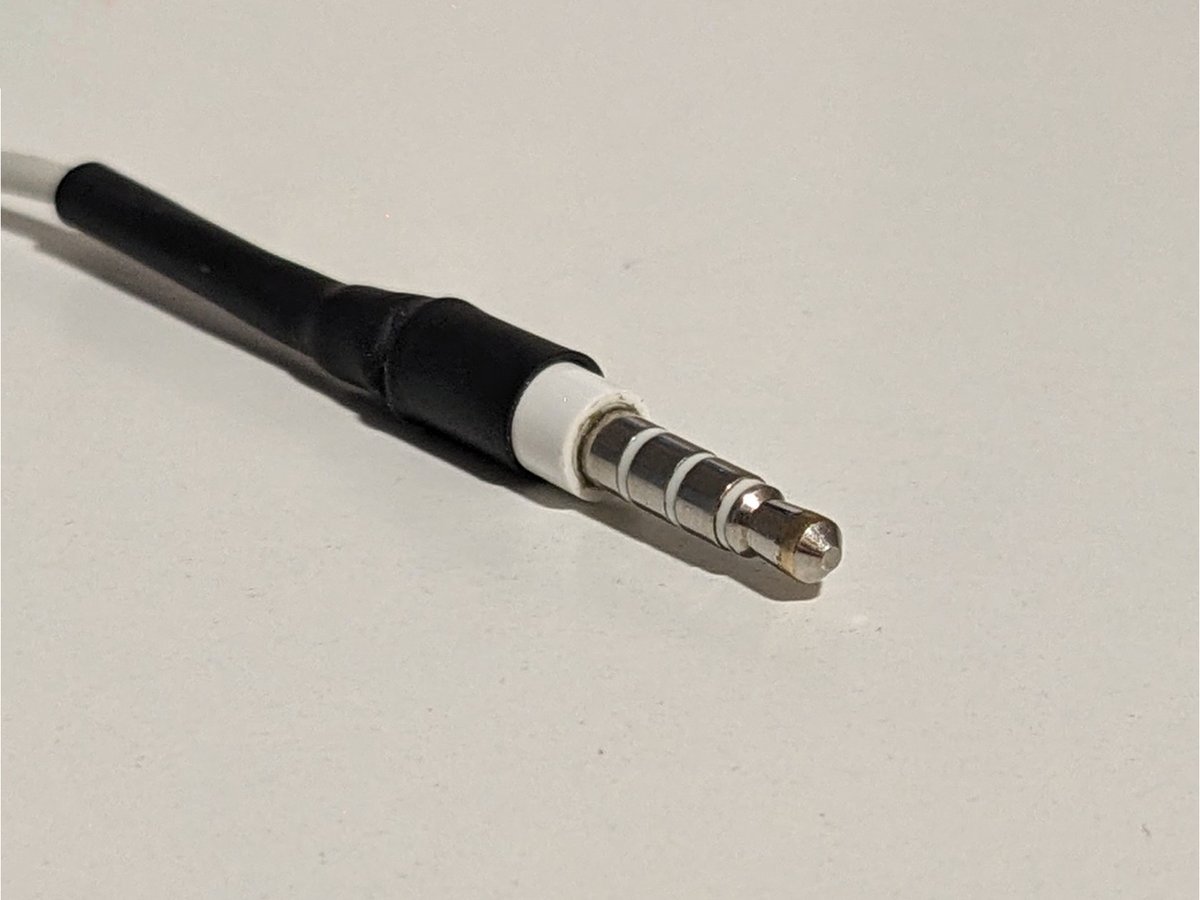
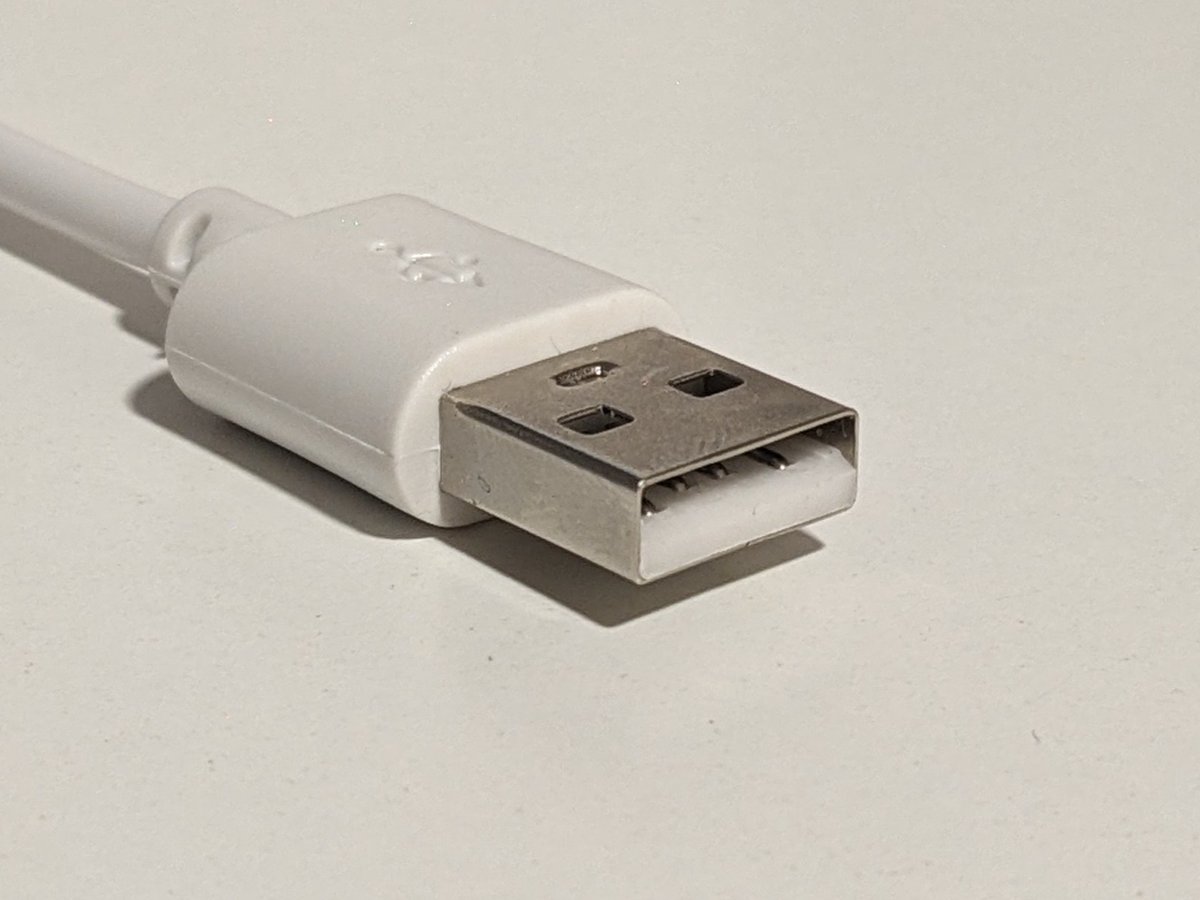
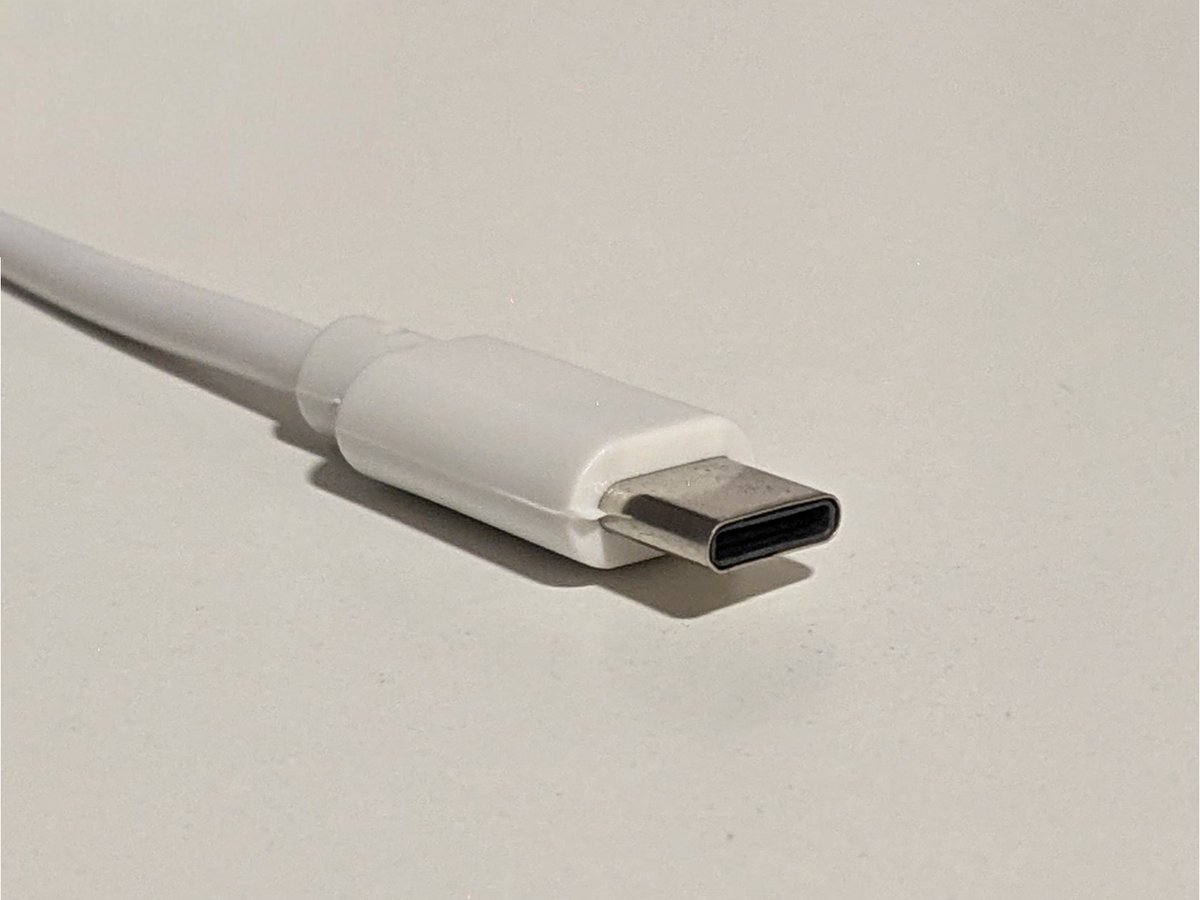
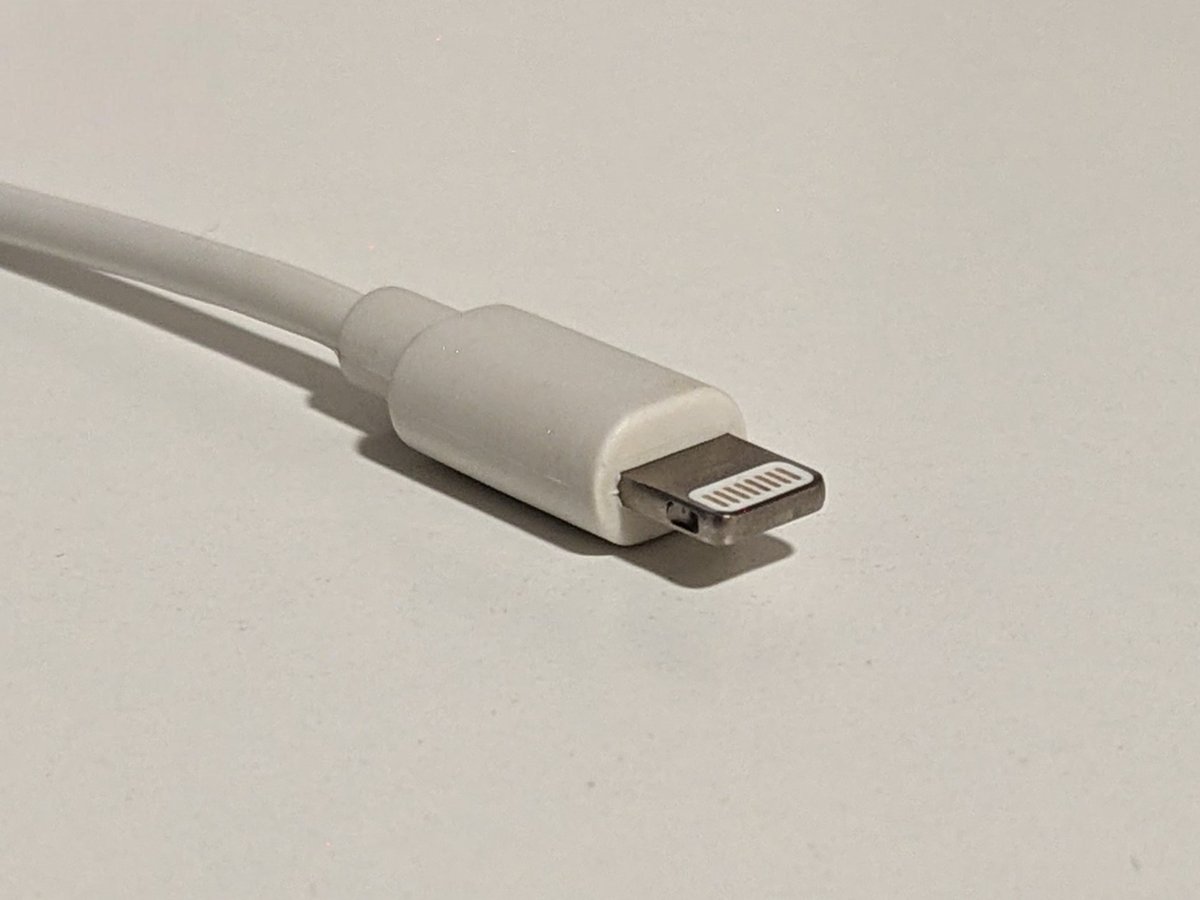
Here's how to tell them apart, and where each one belongs.
3.5mm jack
The round metal pin that's been around for decades. (It's technically called a "plug," but everyone says "jack.") Many laptops and older smartphones have a small round port for it on the side, often with a tiny headphone picture next to it.
USB‑A
The flat rectangular connector you already know from memory sticks and phone chargers. It only goes in one way up, and it's the one everybody has fought with at some point. Most laptops and desktop computers have at least one of these.
USB‑C
A smaller connector with rounded ends, and it goes in either way up, so there's no wrong side. Newer laptops, newer iPads, and most recent Android phones use it. If you bought your device in the last few years, this is likely the one it takes.
Lightning
The small flat connector on older iPhones and iPads. I've included it so you can recognise it, but I'd steer you away from buying a Lightning headset today. Apple has stopped using it on new devices, so it's on the way out, and you'll have less and less choice as time goes on. If you have an older iPhone or iPad that uses Lightning, the better move is to buy a USB‑C headset (or a 3.5mm one) and add a small adapter that turns the Lightning port into the connector your headset uses. That way the headset outlives the phone.
How to decide on a connector
Look at the device you'll be calling on and find the ports that match any of the connectors above. If you wish to make calls from two different devices, select the connector that will work with both devices. If the devices don't share any ports, you'll need to choose a headset that comes with multiple connector options, or buy an adapter. And if you're feeling uncertain, this is exactly the sort of thing we can check together in a video call.
Step two: on the ear, or over the ear
Once you know the connector, the other choice is the shape of the headphones themselves. Both types work fine for a call. This is about what's comfortable on your head.
On‑ear headphones rest against your ears. They're lighter and less bulky, and they're easy to pop on for a quick call. Some people find they get a bit sore after a long time, the way glasses can start to pinch.
Over‑ear headphones are the larger kind, with soft cushions that go right around your ears. They're a little heavier, but many people find them more comfortable to wear for longer, because the pressure sits around your ear instead of on it.
One thing worth knowing if you wear hearing aids: over‑ear headphones are usually the easier choice. The cushion fits around the whole ear, so it gives your hearing aid room and is less likely to press on it or set off that whistling feedback sound. On‑ear headphones sit right where the hearing aid is, which can be fiddly. If you wear hearing aids, start by looking at the over‑ear options below.
Some cheap products with great reviews
You don't need to spend a lot. Here are a handful of well‑reviewed, inexpensive headsets. Each one lists whether it sits on the ear or over it, and which connectors it has, so you can match it to the device you'll be calling on. If you'd rather we choose one together on a call, we can do that too.
Some links below are affiliate links. If you buy something through one, I may earn a small commission, at no extra cost to you. I only recommend things that I would set up for my own family.
Logitech H111
 Cheapest
On‑ear, 3.5mm jack
Light, compact, cheap. Good as a starter headset.
JIAMQISHI EH01
RecommendedOn‑ear, 3.5mm jack & USB‑A
Comfortable, sleek design. Nice colour options.
Logitech H390
On‑ear, USB‑A
Cheap and durable, with three colours to choose from.
Logitech H391
On‑ear, USB‑C
The same as the H390 above, but with a USB‑C connector.
Wantek h882
RecommendedOn‑ear, 3.5mm jack, USB‑A & USB‑C
Good design and sound quality for the price, and it has all three connectors.
HyperX Cloud Stinger 2 Core
Over‑ear, 3.5mm jack
The lowest‑priced over‑ear headset here that still has good reviews.
EKSA H8
RecommendedOver‑ear, 3.5mm jack, USB‑A & USB‑C
Good design and sound quality, and it has all three connectors.
Once it arrives, plug it in before our next call and give it a quick try. If anything about it isn't behaving, bring it to the call and we'll sort it out together. That's what the sessions are for.